
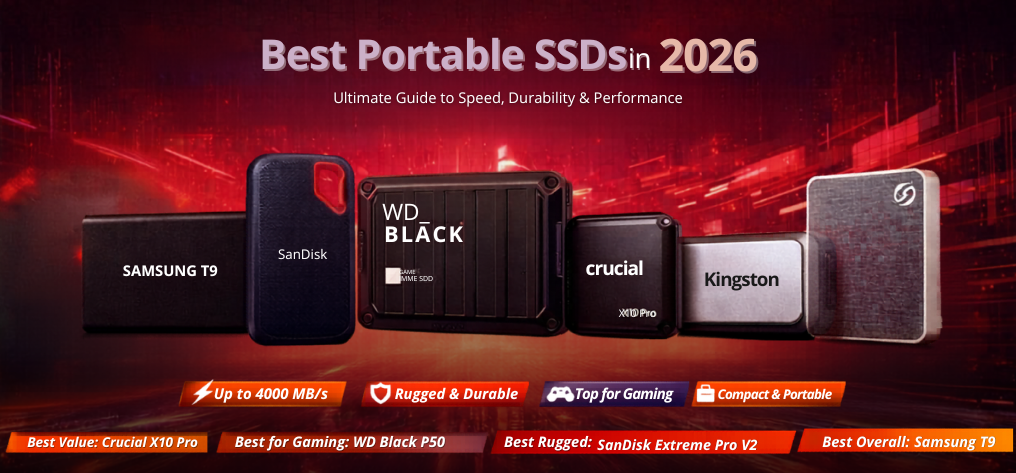
In today’s fast-paced digital environment, portable SSDs have become indispensable tools for professionals, gamers, content creators, and everyday users. Whether we are transferring massive 4K videos, backing up critical data, or expanding storage for laptops and consoles, choosing the best portable SSD ensures maximum speed, reliability, and long-term value.
We present a comprehensive, expertly curated guide to the best portable SSDs in 2026, built to deliver exceptional performance, rugged durability, and seamless compatibility across devices.
Why Portable SSDs Are Essential in 2026
The demand for high-speed storage continues to rise as file sizes grow and workflows become more intensive. Portable SSDs outperform traditional external hard drives in every aspect.
Key advantages include:
- Ultra-fast data transfer speeds (up to 4000 MB/s)
- Compact and lightweight design
- Shock and vibration resistance
- Low power consumption
- Enhanced data security with encryption
Unlike HDDs, SSDs offer instant access times, making them ideal for editing, gaming, and professional workloads.
Top Portable SSDs in 2026 (Expert Picks)
1. Samsung T9 Portable SSD – Best Overall Performance
The Samsung T9 represents the pinnacle of portable storage technology, offering exceptional speed and premium build quality.
Specifications:
- Interface: USB 3.2 Gen 2x2
- Read Speed: Up to 2000 MB/s
- Write Speed: Up to 2000 MB/s
- Capacity: 1TB / 2TB / 4TB
Key strengths:
- Outstanding sustained performance
- Advanced thermal control
- Broad compatibility with Windows, macOS, Android
Best for: Professionals requiring fast, reliable, and consistent performance.
2. SanDisk Extreme Pro Portable SSD V2 – Rugged and Reliable
The SanDisk Extreme Pro V2 is engineered for extreme conditions and high-speed transfers.
Specifications:
- Read Speed: 2000 MB/s
- Write Speed: 2000 MB/s
- IP Rating: IP55 water and dust resistance
Highlights:
- Durable aluminum chassis
- Silicone shell for shock resistance
- Hardware encryption support
Best for: Outdoor creators and users needing rugged durability.
3. WD Black P50 Game Drive SSD – Best for Gaming
The WD Black P50 is tailored for gamers seeking fast load times and high storage capacity.
Specifications:
- Read Speed: 2000 MB/s
- Interface: USB 3.2 Gen 2x2
Advantages:
- Optimized for gaming consoles and PCs
- Large storage options up to 4TB
- Stable performance under heavy load
Best for: Gamers who demand fast game loading and portability.
4. Crucial X10 Pro – High-Speed Value Performer
The Crucial X10 Pro delivers exceptional speed at a competitive price.
Specifications:
- Read Speed: 2100 MB/s
- Write Speed: 2000 MB/s
Why it stands out:
- Compact and lightweight design
- Excellent price-to-performance ratio
- Strong real-world performance
Best for: Users seeking premium speed without premium pricing.
5. Seagate One Touch SSD – Balanced Performance & Style
The Seagate One Touch SSD combines aesthetic design with reliable performance.
Specifications:
- Read Speed: 1030 MB/s
- Slim aluminum enclosure
Features:
- Password protection
- Automatic backup software
- Multiple color options
Best for: Everyday users needing stylish and dependable storage.
6. Kingston XS2000 – Compact Powerhouse
The Kingston XS2000 is one of the smallest high-performance portable SSDs available.
Specifications:
- Read Speed: 2000 MB/s
- Interface: USB 3.2 Gen 2x2
Strengths:
- Pocket-sized design
- Shock-resistant sleeve included
- Ideal for travel and mobile workflows
Best for: Users prioritizing portability without compromising speed.
How to Choose the Best Portable SSD
1. Speed and Interface
- USB 3.2 Gen 2: Up to 1050 MB/s
- USB 3.2 Gen 2x2: Up to 2000 MB/s
- Thunderbolt 3/4: Up to 4000 MB/s
Choosing the right interface ensures maximum performance compatibility.
2. Storage Capacity
Modern use cases require higher capacities:
- 500GB: Basic use
- 1TB: Standard users
- 2TB–4TB: Professionals and gamers
3. Durability and Build Quality
Look for:
- Shock resistance
- Water/dust protection (IP ratings)
- Metal or reinforced casing
4. Security Features
High-end portable SSDs include:
- AES 256-bit hardware encryption
- Password protection
- Secure backup tools
Portable SSD vs External HDD
| Feature | Portable SSD | External HDD |
|---|---|---|
| Speed | Up to 4000 MB/s | Up to 150 MB/s |
| Durability | High | Low |
| Noise | Silent | Audible |
| Portability | Excellent | Moderate |
| Lifespan | Longer | Shorter |
Best Portable SSDs by Use Case
For Content Creators
- Samsung T9
- SanDisk Extreme Pro
For Gamers
- WD Black P50
- Crucial X10 Pro
For Travel
- Kingston XS2000
For Budget Buyers
- Crucial X10 Pro
- Seagate One Touch
Performance Optimization Tips
- Use USB-C Gen 2x2 or Thunderbolt ports
- Keep firmware updated
- Avoid overheating environments
- Use high-quality cables
Future Trends in Portable Storage
The future of portable SSDs includes:
- Faster USB4 and Thunderbolt 5 speeds
- Improved thermal efficiency
- Higher capacities (up to 8TB and beyond)
- AI-enhanced storage management
These innovations will redefine data portability and performance standards.
Final Verdict: Best Portable SSDs to Buy in 2026
- Best Overall: Samsung T9
- Best Rugged: SanDisk Extreme Pro V2
- Best for Gaming: WD Black P50
- Best Value: Crucial X10 Pro
- Best Compact: Kingston XS2000
Selecting the right portable SSD ensures faster workflows, secure data storage, and unmatched convenience.
FAQs
1. What is a portable SSD?
A compact external storage device using flash memory.
2. Are portable SSDs faster than HDDs?
Yes, significantly faster.
3. What speed should I choose?
At least 1000 MB/s for modern use.
4. Is 1TB enough?
Yes for most users.
5. Are portable SSDs durable?
Yes, highly shock-resistant.
6. Can I use it with a phone?
Yes, via USB-C.
7. Do SSDs need power?
No external power required.
8. What is USB 3.2 Gen 2x2?
High-speed interface up to 2000 MB/s.
9. Are they good for gaming?
Yes, excellent for load times.
10. Can I install OS on it?
Yes.
11. Do they overheat?
Slightly, but manageable.
12. Is encryption important?
Yes for data security.
13. Are they compatible with Mac?
Yes.
14. Can I format them?
Yes, easily.
15. What is TBW?
Endurance rating.
16. Are SSDs future-proof?
Yes.
17. How long do they last?
5–10 years.
18. Can I recover lost data?
Possible with tools.
19. Are they expensive?
Prices are decreasing.
20. Can I use for video editing?
Yes, ideal.
21. What cable is best?
USB-C high-speed cable.
22. Are they silent?
Yes.
23. Can SSD fail?
Rarely.
24. Which brand is best?
Samsung, WD, SanDisk.
25. Should I buy now?
Yes, great time.