
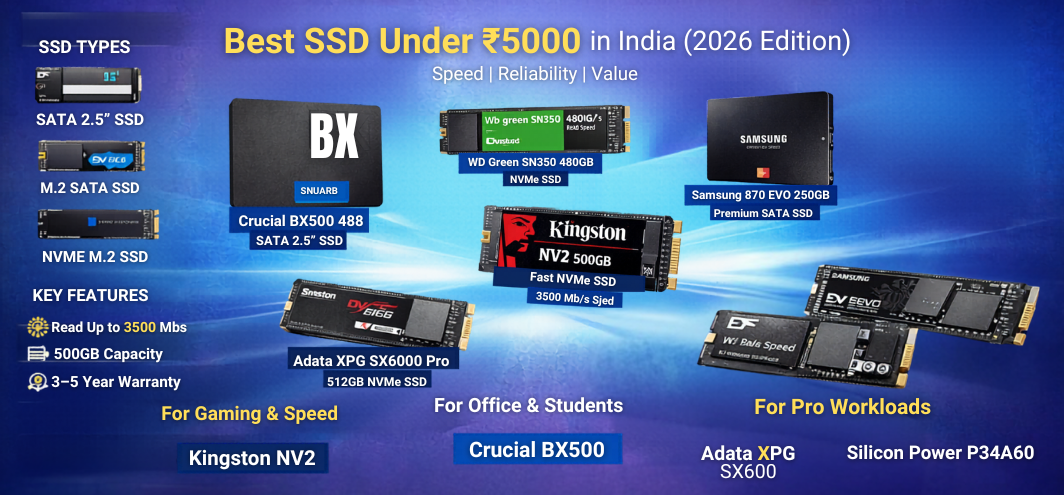
Upgrading to a Solid State Drive (SSD) is the single most effective way to transform a slow laptop or desktop into a fast, responsive machine. With prices becoming increasingly affordable, it is now possible to purchase a high-performance SSD under ₹5000 that delivers exceptional speed, durability, and reliability for everyday use, gaming, and professional workloads.
We present a comprehensive, detail-rich guide to help you select the best SSD under ₹5000 based on performance, endurance, interface type, storage capacity, and real-world usage. This guide is designed to help you make an informed decision without confusion, ensuring you invest in the most efficient storage upgrade available within your budget.
Why Upgrading to an SSD Is Essential in 2026
Traditional hard drives are now the biggest performance bottleneck in most systems. SSDs eliminate mechanical delays and offer:
- 5x to 20x faster boot times
- Instant application launches
- Lag-free multitasking
- Silent operation
- Lower power consumption
- Improved system lifespan
For under ₹5000, you can now obtain SSDs that offer speeds previously reserved for premium devices.
Understanding SSD Types Before Buying
1. SATA 2.5-inch SSD
- Compatible with older laptops and desktops
- Max speeds around 550 MB/s
- Best for HDD replacements
2. M.2 SATA SSD
- Same speed as SATA but compact
- Fits directly on motherboard
- No cables required
3. NVMe M.2 SSD
- Uses PCIe interface
- Speeds up to 3500 MB/s or more
- Ideal for gaming and professional use
If your motherboard supports NVMe, it is always the best choice under ₹5000.
Key Factors to Consider When Buying an SSD Under ₹5000
- Interface compatibility (SATA vs NVMe)
- Read/Write speeds
- NAND type (TLC preferred over QLC)
- TBW (Total Bytes Written) endurance
- Warranty (3–5 years recommended)
- Brand reliability and firmware stability
Top SSDs Under ₹5000 in India
1. Crucial BX500 480GB SATA SSD
Best for upgrading old laptops and desktops
- Read: 540 MB/s | Write: 500 MB/s
- 480GB capacity
- 3-year warranty
- Excellent for everyday use
This SSD is ideal for breathing new life into aging systems.
2. WD Green SN350 480GB NVMe SSD
Best budget NVMe SSD
- Read: 2400 MB/s | Write: 1650 MB/s
- NVMe Gen3 performance
- Low power consumption
- Reliable for office and home use
Offers outstanding value for NVMe speeds under budget.
3. Kingston NV2 500GB NVMe SSD
Best overall performance under ₹5000
- Read: 3500 MB/s | Write: 2100 MB/s
- PCIe Gen4 compatible (runs on Gen3)
- Excellent endurance
- 3-year warranty
Ideal for gamers and heavy multitaskers.
4. Samsung 870 EVO 250GB SATA SSD
Best premium SATA SSD for reliability
- Read: 560 MB/s | Write: 530 MB/s
- Industry-leading durability
- 5-year warranty
- Exceptional firmware stability
Perfect where reliability matters more than capacity.
5. Adata XPG SX6000 Pro 512GB NVMe SSD
Best high-capacity NVMe option
- Read: 2100 MB/s | Write: 1500 MB/s
- 512GB storage
- Gaming-friendly performance
- Great thermal control
6. Silicon Power P34A60 512GB NVMe SSD
Best hidden gem for value
- Read: 2200 MB/s | Write: 1600 MB/s
- Excellent endurance
- Stable performance
- Budget-friendly NVMe option
7. WD Blue SA510 500GB SATA SSD
Best SATA SSD for long-term use
- Read: 560 MB/s | Write: 520 MB/s
- Durable and consistent
- Suitable for professional workloads
Performance Comparison Table
| SSD Model | Type | Capacity | Read Speed | Write Speed | Best For | Warranty |
|---|---|---|---|---|---|---|
| Crucial BX500 | SATA | 480GB | 540 MB/s | 500 MB/s | Old laptops | 3 Years |
| WD Green SN350 | NVMe | 480GB | 2400 MB/s | 1650 MB/s | Budget NVMe | 3 Years |
| Kingston NV2 | NVMe | 500GB | 3500 MB/s | 2100 MB/s | Gaming | 3 Years |
| Samsung 870 EVO | SATA | 250GB | 560 MB/s | 530 MB/s | Reliability | 5 Years |
| Adata XPG SX6000 | NVMe | 512GB | 2100 MB/s | 1500 MB/s | Storage + speed | 5 Years |
| Silicon Power P34A60 | NVMe | 512GB | 2200 MB/s | 1600 MB/s | Value | 5 Years |
| WD Blue SA510 | SATA | 500GB | 560 MB/s | 520 MB/s | Work use | 5 Years |
NVMe vs SATA: Which Should You Choose?
| Feature | SATA SSD | NVMe SSD |
|---|---|---|
| Speed | Up to 550 MB/s | Up to 3500 MB/s |
| Price | Slightly cheaper | Better value now |
| Installation | Cable required | Direct motherboard |
| Gaming | Good | Excellent |
| Boot Time | Fast | Extremely fast |
If your system supports NVMe, it is always the smarter investment.
Best SSD Under ₹5000 for Specific Use Cases
For Gaming
- Kingston NV2
- WD Green SN350
For Office & Students
- Crucial BX500
- WD Blue SA510
For Video Editing & Heavy Work
- Adata XPG SX6000
- Silicon Power P34A60
For Old Laptop Upgrade
- Crucial BX500
- Samsung 870 EVO
Installation Tips for Maximum Performance
- Enable AHCI mode in BIOS
- Use NVMe slot for best speed
- Keep 20% free space for longevity
- Update SSD firmware after installation
- Clone OS using reliable software
Common Mistakes to Avoid When Buying SSDs
- Buying SATA when NVMe is supported
- Ignoring warranty and TBW ratings
- Choosing QLC over TLC for primary drive
- Filling SSD to 100% capacity
- Using outdated SATA cables
How SSD Improves Daily Productivity
- Windows boots in under 10 seconds
- Browsers open instantly
- File transfers complete in seconds
- No lag while multitasking
- Faster game loading screens
Durability and Lifespan Expectations
Modern SSDs under ₹5000 offer TBW ratings between 150TB to 600TB, enough for 8–10 years of regular use.
Best Capacity Choice Under ₹5000
- 250GB: Only for OS
- 500GB: Best balance
- 512GB NVMe: Ideal choice
Who Should Buy an SSD Under ₹5000?
- Students
- Gamers on budget
- Office professionals
- Laptop users with slow HDD
- Content creators starting out
Final Recommendation
For most users, Kingston NV2 500GB NVMe provides the best balance of speed, price, and reliability. For older systems, Crucial BX500 480GB remains the smartest upgrade.
FAQs
- What is the best SSD under ₹5000?
Kingston NV2 500GB NVMe. - Is NVMe better than SATA?
Yes, significantly faster. - Can SSD improve gaming performance?
Yes, faster load times. - How long does SSD last?
8–10 years typically. - Is 250GB enough?
Only for OS usage. - Which SSD for old laptop?
Crucial BX500. - Do SSDs heat up?
Slightly, NVMe more than SATA. - Need heatsink for NVMe?
Optional but helpful. - Can SSD fail suddenly?
Rare, very reliable. - Is cloning safe?
Yes with proper tools. - SSD vs HDD lifespan?
SSD lasts longer. - Does SSD affect battery?
Improves battery life. - Which NAND is best?
TLC NAND. - Is DRAM important?
Helpful but not mandatory. - How to check compatibility?
Check motherboard specs. - Can I use SSD externally?
Yes with enclosure. - Does SSD need defragmentation?
No. - What is TBW?
Total write endurance. - Which brand is most reliable?
Samsung, WD, Crucial, Kingston. - Can SSD store games?
Yes, ideal for games. - Does SSD speed reduce over time?
Slightly when full. - Is firmware update needed?
Recommended. - Can SSD replace HDD fully?
Yes. - Do SSDs make noise?
No. - Best capacity choice?
500GB.