
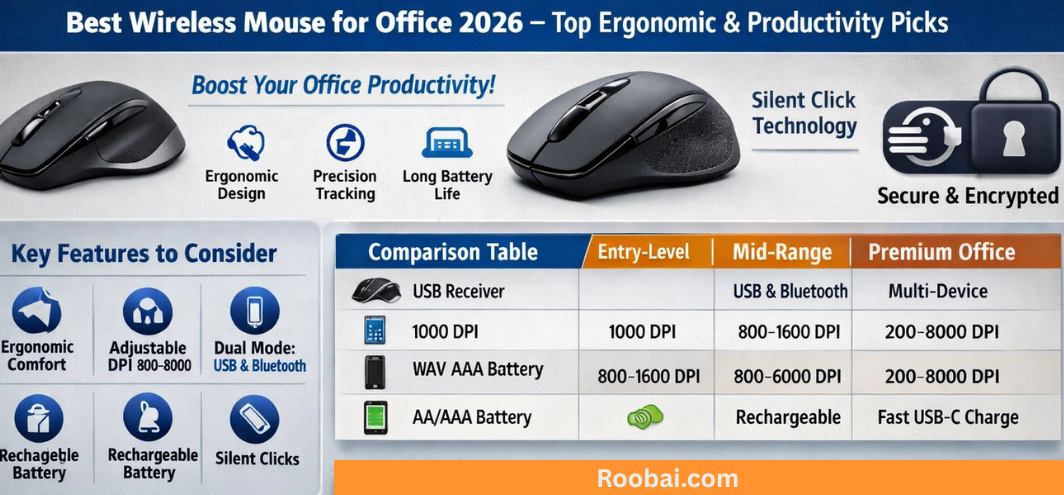
A high-performance wireless mouse for office work is an essential productivity tool in modern corporate environments. From navigating large spreadsheets and preparing presentations to managing multiple monitors and attending virtual meetings, the right mouse significantly enhances speed, comfort, and accuracy. We present a complete, deeply structured guide to help professionals select the best wireless mouse for office use with confidence and clarity.
Why the Right Wireless Mouse Matters in a Professional Office
Every click, scroll, and drag action impacts workflow efficiency. A poorly designed mouse can lead to discomfort, reduced precision, and long-term strain. In contrast, a well-engineered office wireless mouse provides:
-
Seamless navigation
-
Reduced wrist fatigue
-
Faster multi-tasking
-
Higher cursor accuracy
-
Improved workplace comfort
-
Professional-level durability
Selecting the right model transforms daily computer interactions into effortless productivity.
Core Features of the Best Wireless Mouse for Office Work
1. Ergonomic Design for Extended Usage
Professionals often use a mouse for 6–10 hours daily. Ergonomic architecture is essential to reduce repetitive strain. The best designs include:
-
Sculpted palm support
-
Thumb rest contour
-
Balanced weight distribution
-
Soft matte grip
-
Natural wrist alignment
An ergonomic wireless mouse protects long-term wrist health while ensuring all-day comfort.
2. Precision Tracking and Adjustable DPI
DPI (Dots Per Inch) determines pointer sensitivity. A professional office mouse should offer adjustable DPI settings for different tasks.
| Office Task | Recommended DPI Range |
|---|---|
| Basic Browsing | 800–1200 DPI |
| Spreadsheet Work | 1000–1600 DPI |
| Multi-Monitor Setup | 1200–2400 DPI |
| Creative Design | 1600–3200 DPI |
Higher DPI enables faster navigation across large screens, while lower DPI provides accurate control for detail-heavy tasks.
3. Reliable Wireless Connectivity
A dependable connection eliminates cursor lag and dropouts. Office wireless mice typically use:
-
2.4GHz USB Receiver – Stable, plug-and-play simplicity
-
Bluetooth Connectivity – No dongle required, ideal for laptops
Premium models feature dual connectivity, allowing seamless switching between devices.
4. Long Battery Life and Power Efficiency
A corporate environment demands uninterrupted performance. Look for:
-
Battery life between 6 to 24 months
-
Automatic sleep mode
-
USB-C fast charging
-
Rechargeable lithium battery
Rechargeable wireless mice are environmentally responsible and cost-efficient for daily professional use.
5. Silent Click Technology
In open office settings, quiet functionality matters. Silent-click switches reduce noise while maintaining tactile response. This feature ensures a distraction-free workspace and improves meeting etiquette.
Types of Wireless Mouse for Office Professionals
Ergonomic Wireless Mouse for All-Day Comfort

Multi-Device Wireless Mouse for Modern Workflows
Multi-device models allow instant switching between:
-
Laptop
-
Desktop
-
Tablet
-
Presentation system
This functionality is especially valuable for managers and hybrid professionals handling multiple systems daily.
Comprehensive Comparison Table
| Feature | Entry-Level | Mid-Range | Premium Office Mouse |
|---|---|---|---|
| Connectivity | USB Receiver | Bluetooth | Dual Mode + Multi-Device |
| DPI | Fixed | Adjustable | Wide DPI Range |
| Battery | Replaceable | Rechargeable | Fast Charge USB-C |
| Silent Click | No | Yes | Advanced Silent Switch |
| Scroll Wheel | Basic | Precision Rubber | Magnetic Hyper Scroll |
| Build Quality | Plastic | Reinforced Shell | Premium Matte Finish |
Optical vs Laser Sensor Technology
| Optical Sensor | Laser Sensor |
|---|---|
| Ideal for standard desks | Works on varied surfaces |
| Cost-effective | More versatile |
| Excellent precision | Higher sensitivity |
For traditional office desks, optical sensors deliver reliable accuracy. For flexible or mobile workspaces, laser tracking provides additional adaptability.
Rechargeable vs Replaceable Battery Mouse
Rechargeable Wireless Mouse
-
Lower long-term cost
-
Eco-friendly
-
Fast charging support
-
Best for daily professional use
Battery-Operated Wireless Mouse
-
Long standby duration
-
Convenient for occasional users
-
No charging required
For consistent corporate performance, rechargeable models deliver superior efficiency.
Security and Professional Data Safety
In corporate environments, encrypted wireless transmission is essential. Modern office mice feature:
-
Encrypted 2.4GHz signals
-
Secure Bluetooth protocols
-
Stable interference-free connectivity
Security protects sensitive corporate data during daily operations.
Ergonomics and Workplace Health Impact
Choosing the right mouse helps prevent:
-
Wrist fatigue
-
Finger strain
-
Shoulder tension
-
Repetitive strain injuries
An ergonomic wireless mouse promotes improved posture and sustainable long-term productivity.
How to Choose the Best Wireless Mouse for Your Role
For Corporate Executives
-
Premium build quality
-
Multi-device support
-
Silent clicks
-
Long battery life
For Data Analysts
-
Adjustable DPI
-
Horizontal scrolling
-
Precise optical sensor
For Designers
-
High DPI sensitivity
-
Smooth glide
-
Multi-monitor precision
For Administrative Staff
-
Lightweight design
-
Quiet operation
-
Easy plug-and-play
Maintenance Tips for Long-Term Performance
-
Clean sensor lens regularly
-
Use a mouse pad for better tracking
-
Avoid dropping the mouse
-
Store away from moisture
-
Update firmware if supported
Proper care extends product lifespan significantly.
Future Innovations in Office Wireless Mice
The next generation includes:
-
AI-assisted gesture controls
-
Wireless charging docks
-
Ultra-low latency Bluetooth
-
Cross-platform productivity software integration
The evolution of the office mouse continues to redefine professional efficiency.
FAQs
1. What is the ideal DPI for office tasks?
1000–1600 DPI works best for most professionals.
2. Is Bluetooth or 2.4GHz better?
Both are reliable; Bluetooth saves USB ports.
3. How long should battery last?
6 to 24 months depending on usage.
4. Are silent mice effective?
Yes, especially for shared workspaces.
5. Is ergonomic design necessary?
Highly recommended for long hours.
6. Can I connect to multiple devices?
Yes, if the mouse supports multi-device pairing.
7. Do wireless mice lag?
Modern models offer near-zero latency.
8. Optical or laser sensor?
Optical is sufficient for desk surfaces.
9. Is rechargeable better?
Yes, for daily professional use.
10. Does weight matter?
Balanced weight improves control.
11. Can it work on glass?
Laser performs better on glass.
12. What is polling rate?
Frequency at which mouse updates cursor.
13. Are wireless mice secure?
Yes, if encrypted protocols are used.
14. How often to clean?
Weekly cleaning recommended.
15. What size mouse is ideal?
Medium size fits most hands.
16. Do office mice support Mac?
Most support Windows and macOS.
17. Can buttons be customized?
Yes, in premium models.
18. Is horizontal scroll useful?
Very useful for spreadsheets.
19. How long does a mouse last?
Typically 3–5 years.
20. What grip style is best?
Palm grip suits long office use.
21. Is silent click durable?
Yes, built for millions of clicks.
22. Do I need a mouse pad?
Recommended for precision.
23. What connectivity is fastest?
2.4GHz is typically fastest.
24. Can I travel with it?
Yes, compact models are travel-friendly.
25. What makes a mouse professional-grade?
Ergonomics, precision, durability, and long battery life.
For more information and to start using Roobai.com, visit our official website and download the app to stay updated on the best deals and offers. With Roobai.com, you can ensure that every shopping experience is not just an opportunity to shop but an opportunity to save big